Paste any Pin link and save it in HD — MP4 video, original image, or GIF. One click. No login, no watermark.
Download a Pin in three steps
Here's exactly what each step looks like.
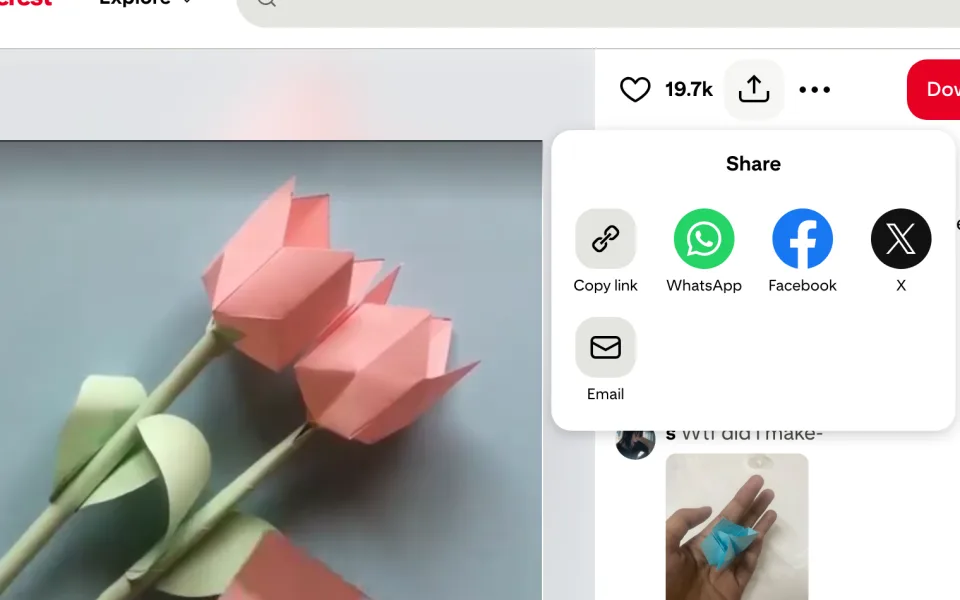
Copy the Pin link
On Pinterest, tap Share → Copy link on any video, image, GIF or Idea Pin.
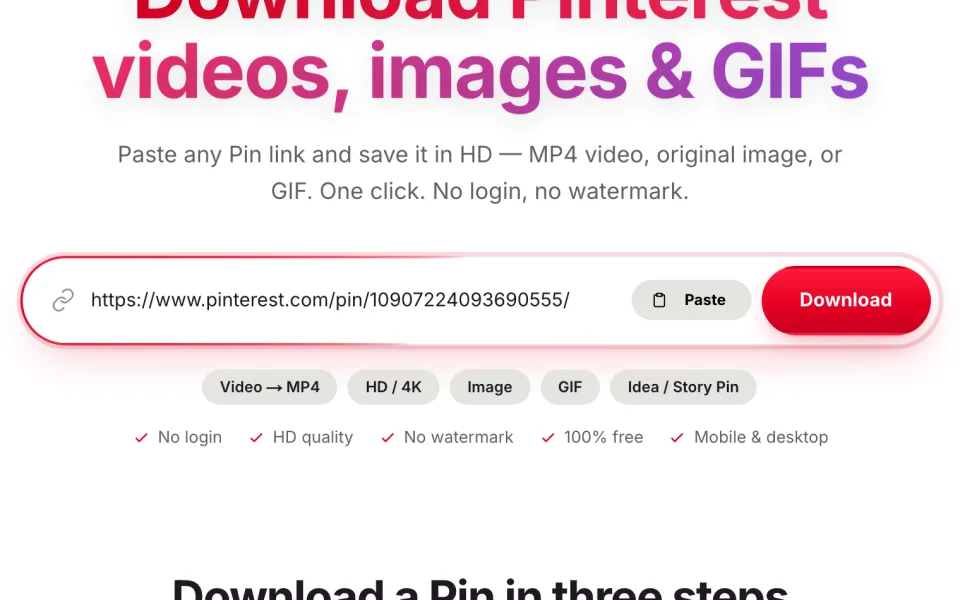
Paste it above
Drop the pinterest.com/pin/… or pin.it/… link into the box and hit Download.
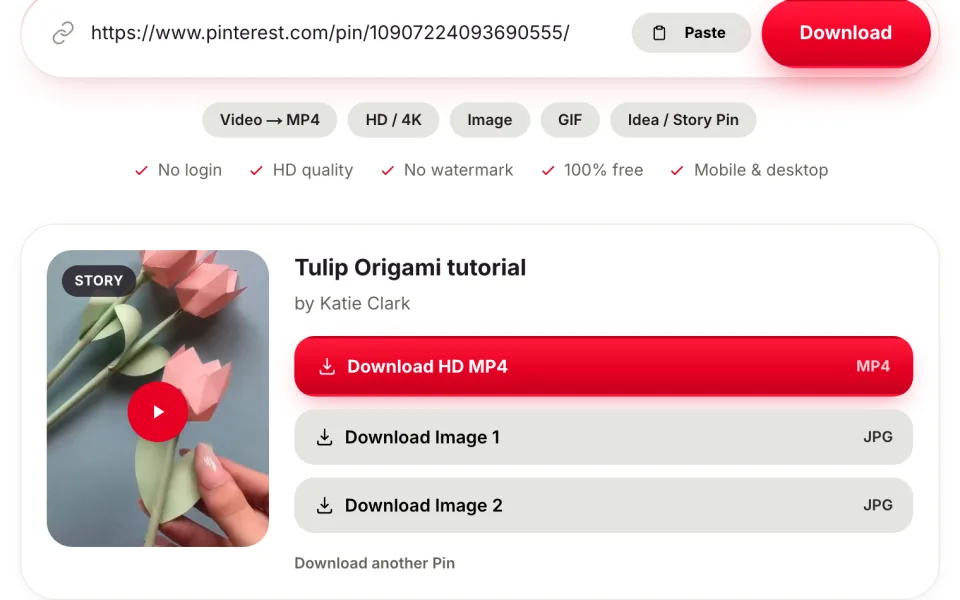
Save in HD
Pick your quality and the file saves straight to your device — no watermark.
Watch the tutorials
Prefer to watch? Here's the whole thing in a couple of minutes.
How to Download Pinterest Videos
Download with the Chrome extension
Everything from a Pin, in full quality
HD MP4 video
Grab Pinterest videos in the highest quality the Pin offers, as a clean MP4.
Images & GIFs
Download original-resolution images and animated GIFs, not blurry thumbnails.
Idea & Story Pins
Pull every slide from multi-page Idea Pins and carousels.
No login, no app
Works right in your browser on iPhone, Android, Mac and Windows.
No watermark
Files come exactly as posted — we never stamp anything on them.
Fast & free
Extraction runs in about a second, and it stays completely free.
Step-by-step guide
How to Download Pinterest Videos
Pinterest doesn't offer a download button for videos, so the dependable way to download a Pinterest video is to copy the Pin's link and pass it through a downloader. Below is the exact process on iPhone, Android and desktop — in full HD and without a watermark — plus how to save images, GIFs and Idea Pins the same way.
On iPhone & iPad
- 1Open the Pinterest app and tap the video Pin you want.
- 2Tap the share icon, then choose Copy link.
- 3Come back here, paste the link in the box above, and tap Download.
- 4Pick the quality — the MP4 saves to Files, and you can move it into Photos from there.
On Android
- 1In the Pinterest app, open the Pin and tap the share arrow (or the three dots).
- 2Tap Copy link.
- 3Paste it into the box above and tap Download.
- 4Choose the MP4 — it lands in your Downloads folder or Gallery.
On computer
- 1Open the Pin on pinterest.com in any browser.
- 2Copy the URL from the address bar, or use Share → Copy link.
- 3Paste it above and click Download.
- 4Save the MP4 to your computer — it goes to your Downloads folder.
Download Pinterest videos in HD — 720p, 1080p and 4K
Quality depends on what the creator uploaded. When a Pin offers more than one resolution, our HD Pinterest video downloader lists them so you can take the sharpest — 720p, 1080p, or 4K when it exists. The original file is passed through without re-encoding, so nothing is lost between Pinterest and your device.
Save Pinterest videos without a watermark
Pinterest doesn't brand most videos; when a download has a logo in the corner, another tool added it. Every file here comes back exactly as posted, with no watermark — clean and ready to edit, remix or repost.
Save a Pinterest video to your Camera Roll or Gallery
On iPhone the video lands in Files first — open it and tap Save Video to move it into Photos. On Android it usually appears straight in your Gallery or Downloads folder. Our guide to saving Pinterest videos covers every case, including when a clip won't show up in your camera roll.
More than video — images, GIFs and Idea Pins
The same box downloads far more than clips. Paste an image Pin for the full-resolution photo, a GIF for the animation that actually plays, or an Idea or Story Pin to pull every slide at once.
Pinterest to MP4 — the format that plays everywhere
Pinterest already streams video as MP4, so there's no conversion step and nothing to install. Paste a Pin and save it as an MP4 that opens in your gallery, in editors like CapCut or Premiere, and on any social app.
Why an online downloader beats an app or extension
A website works on every device with nothing to install, and it can't run in the background or read the pages you visit the way a browser extension can. Paste a link, save the file, close the tab — that's the whole process, and it stays free and private.
Download Pinterest videos on PC, Mac and laptop
Nothing to install on desktop: paste a Pin's link into the box above in Chrome, Safari, Edge or Firefox and the MP4 saves straight to your Downloads folder. For a one-click grab without leaving Pinterest, our Chrome extension adds a download button right where you browse.
Save a whole Pinterest board or a carousel
You're not limited to one Pin at a time. See how to save an entire board, and paste any multi-image Pin to pull every photo in a carousel at once — no clicking through slide by slide.
Can you download someone else's Pinterest video?
Usually yes — saving inspiration offline is normal — but the content still belongs to its creator. We cover when that's fine and when it isn't; the short version is to keep saves for personal use and to credit or ask before reposting. See our responsible-use notes.
Downloading private and secret-board Pins
A downloader can only reach what your own account can already see, so a private or secret-board Pin works when you're signed in and viewing it. There's no way to unlock Pins that aren't shared with you — and we wouldn't try.
Pinterest video won't download? Quick fixes
Most failures come down to the wrong link, or a Pin that's really an image. If a clip won't save, re-copy the pinterest.com/pin/… URL and confirm the Pin is actually a video — our guide to why some Pins won't download covers the rest.
Repost to Instagram, TikTok or WhatsApp Status
Because files come back clean and watermark-free, they're ready to reuse. See how to repost a Pinterest video to Reels or TikTok, or size one for WhatsApp Status — always with the creator's permission.
The complete guide
Everything you need to download from Pinterest
How to download a Pinterest video, step by step
Pinterest was built for saving ideas to boards, not for downloading the files behind them — most video Pins have no download button at all, which is exactly the gap a Pinterest video downloader closes. To download a Pinterest video, open the Pin in the app or on pinterest.com, tap Share and choose Copy link (or copy the URL straight from your browser's address bar), then paste that pinterest.com/pin/… or pin.it/… link into the box at the top of this page and press Download. Within a second or two you'll see the original MP4 — choose the quality you want and it saves straight to your phone or computer. There's no screen recording, no re-encoding and nothing to install.
Download Pinterest videos in HD — and 4K when it exists
A single Pin can hold several encodes at different resolutions, and a blurry save usually means a low one was chosen for you. Our HD Pinterest video downloader reads the Pin and shows every resolution it actually contains, so you can take the sharpest — commonly 720p or 1080p, and 4K when the creator uploaded it that way. Because the original file is passed through without re-encoding, the video you download is what's on Pinterest, pixel for pixel — no softening, no compression artefacts and no shrunken frame.
How to download a Pinterest video without a watermark
Pinterest doesn't stamp a logo onto the videos people upload, so any watermark you've seen on a “downloaded” Pinterest video was added by the downloader, not by Pinterest. PinterestClick never does. To download a Pinterest video without a watermark, you simply paste the link and save — the file comes back exactly as the creator posted it, clean and ready to edit, remix or repost. That matters when you're pulling reference footage into CapCut, Premiere or your own edits.
One tool for images, GIFs, Idea Pins and MP4
The same box is also a full Pinterest image downloader, GIF downloader and Idea Pin downloader. Paste an image Pin and you get the original, full-resolution photo instead of the small thumbnail Pinterest shows in the grid — ideal for wallpapers, prints and mood boards. Paste an animated Pin and you get the moving GIF or MP4 rather than a frozen frame, and an Idea or Story Pin returns every slide on its own. Because Pinterest already streams in MP4, saving Pinterest to MP4 needs no conversion step at all.
Is it safe, free, and does it work on every device?
PinterestClick is completely free, needs no account and sets no limit on how many Pins you download. It runs entirely in your browser, so it works the same on iPhone, iPad, Android, Mac, Windows and Chromebook — there's no app or extension to install, and closing the tab is all the cleanup there is. We keep no history of what you save. The one thing no Pinterest downloader can reach is content that isn't public: private or secret boards, deleted or region-locked Pins, and anything behind a login stay off-limits — which is exactly as it should be.
What works, and what doesn't
PinterestClick reads public Pins straight from Pinterest. Here's exactly what it can and can't grab, so there are no surprises.
What works
- ✓Public video Pins → HD MP4
- ✓4K video when the Pin has it
- ✓Photos & images at full resolution
- ✓Animated GIFs (as GIF or MP4)
- ✓Idea Pins & Story Pins — every slide
- ✓Multi-image carousels
- ✓Whole public boards — a batch at a time
- ✓Original audio kept in every video
- ✓Full-length clips — no time cap
- ✓pin.it short links & country URLs
- ✓No login or account — unlimited saves
- ✓Original file — no re-encoding or watermark
- ✓Any browser, phone or desktop — no app
What doesn't
- ✕Private or secret boards
- ✕Deleted or expired Pins
- ✕Region-locked Pins
- ✕Age-restricted or flagged Pins
- ✕Video hosted on a linked outside site
- ✕Audio-only (MP3) pulled from a video
- ✕An entire board as one giant zip
- ✕Every Pin from a profile at once
- ✕Editing or trimming the clip for you
- ✕Anything behind a Pinterest login
Frequently asked
How do I download a Pinterest video?+
Copy the Pin's link (Share → Copy link), paste it into the box at the top of this page, and press Download. Choose the MP4 quality you want and it saves to your device.
Can I download Pinterest videos on iPhone or Android?+
Yes. PinterestClick runs entirely in your mobile browser — no app to install. On iPhone, saved videos appear in Files (or Photos after you open them from Files).
Is there a watermark on downloads?+
No. We return the original file exactly as it was uploaded to Pinterest, with no watermark added.
Is it free?+
Completely free, with no account required and no limit on how many Pins you download.
Can I download images and GIFs too?+
Yes — paste any image, GIF, Idea Pin or carousel link and you'll get the original-quality files to save.
How do I save a Pinterest video to my camera roll?+
Download the MP4 here first, then move it into your photos. On iPhone, open the file in Files and tap Share → Save Video; on Android it usually appears in your Gallery or Downloads automatically.
Why can't I download videos from Pinterest directly?+
Pinterest streams its videos, so there's no file to right-click or a download button to press. Copying the Pin's link and pasting it here pulls the actual MP4 for you.
Can I download someone else's Pinterest video?+
Any public Pin works, but a download isn't a licence. Keep it for personal use, and get the creator's permission before reposting or using their work commercially.
From the guides
All guides →Pinterest Video Downloader: Save Any Pin as HD MP4 (Free)
Use our free Pinterest video downloader to save any Pin as an HD MP4 — no login, no watermark, works on phone and desktop.
Read guide →how to download Pinterest videoHow to Download a Pinterest Video on iPhone, Android & PC
Step-by-step guide to download a Pinterest video on iPhone, Android, Windows or Mac — free, in HD, and without a watermark.
Read guide →pinterest image full resolutionWhy Are Pinterest Images Blurry — and How to Save Them Full-Size
Saved a Pinterest image and it came out small or blurry? That's the grid thumbnail — here's how to save the original, full-resolution photo instead.
Read guide →pinterest gif saves as videoWhy Do Pinterest GIFs Save as a Video (or a Frozen Frame)?
Tried to save a Pinterest GIF and got a video or a frozen still? Here's why animated Pins aren't really GIFs — and how to save the moving file as a GIF or MP4.
Read guide →Pinterest to MP4Pinterest to MP4 — Download Pin Videos as MP4
Convert and download any Pinterest video as an MP4. No converter software needed — paste the link and save, free and in HD.
Read guide →pinterest video blurryWhy Is My Pinterest Video Download Blurry? (How to Get HD)
Downloaded a Pinterest video and it looks blurry or low-quality? Here's why it happens — and how to grab the sharpest HD or 4K version the Pin actually contains.
Read guide →save Pinterest videoHow to Save Pinterest Videos to Your Camera Roll or Gallery
Save Pinterest videos to your iPhone Camera Roll or Android Gallery with one extra step. Free, in full quality, no watermark.
Read guide →Pinterest Idea Pin downloaderHow to Download Pinterest Idea Pins & Story Pins
Download every slide of a Pinterest Idea Pin or Story Pin — video and images — in full quality, free and with no watermark.
Read guide →best Pinterest video downloaderBest Pinterest Video Downloader in 2026 (Free & No App)
What to look for in a Pinterest video downloader, and why an online tool beats apps and extensions. Free, HD, no watermark.
Read guide →pinterest video watermarkDo Pinterest Video Downloads Have a Watermark? (And How to Avoid One)
Does Pinterest add a watermark to videos? No — but many downloaders do. Here's where the logo comes from, and how to get a clean, watermark-free video.
Read guide →Pinterest video for WhatsApp StatusHow to Download Pinterest Videos for WhatsApp Status
Save aesthetic Pinterest videos and set them as your WhatsApp Status — HD, under 30 seconds, no watermark. Free, on phone and desktop.
Read guide →Pinterest se video kaise download karePinterest Se Video Kaise Download Kare (Aasan Tarika)
Pinterest se video kaise download kare? Pin ka link copy karein, PinterestClick me paste karein aur HD MP4 paayein. Free, bina login, bina watermark.
Read guide →Pinterest reels video downloadPinterest Reels Video Download — Save Reels in HD (Free)
Download Pinterest reels — the short video Pins — in HD MP4, free and without a watermark. Works on iPhone, Android and desktop in seconds.
Read guide →why can't I download Pinterest videosWhy Can't I Download Pinterest Videos? (And How To)
Pinterest has no download button for videos because it streams them. Here's why there's no save option — and the simple way to download any Pinterest video anyway, free.
Read guide →download someone else's Pinterest videoCan You Download Someone Else's Pinterest Video? (What's Allowed)
Yes, you can download other people's public Pinterest videos — but downloading isn't owning. Here's what's allowed, what isn't, and how to do it the right way.
Read guide →pinterest private video downloaderPinterest Private Video Downloader: What You Can and Can't Save
Can you download videos from a private or secret Pinterest board? Here's why private Pins can't be saved by any downloader — and the options you do have.
Read guide →download Pinterest boardHow to Download an Entire Pinterest Board (Every Pin)
Want to save a whole Pinterest board at once? Here's the realistic way to download every Pin on a board — images and videos — without a sketchy bulk tool.
Read guide →are pinterest video downloaders safeAre Pinterest Video Downloaders Safe? (And Are They Legal?)
Are Pinterest video downloaders safe to use? Here's how to spot a trustworthy one, the red flags to avoid, and where downloading sits legally.
Read guide →pinterest video won't downloadPinterest Video Won't Download? 7 Reasons and Fixes
Pinterest video not downloading? Here are the most common reasons a Pin won't save — private boards, bad links, region locks — and how to fix each one.
Read guide →repost Pinterest video to InstagramHow to Repost Pinterest Videos to Instagram Reels & TikTok
Want to reshare a Pinterest video to Instagram Reels, TikTok or WhatsApp Status? Here's how to download it clean and vertical — and how to do it without stepping on the creator.
Read guide →pinterest video qualityPinterest Video Quality Explained: 720p, 1080p & 4K
What quality are Pinterest videos, and can you get 1080p or 4K? Here's how Pinterest handles resolution — and how to always download the sharpest version available.
Read guide →where do Pinterest downloads goWhere Do Pinterest Downloads Save on Your Phone?
Downloaded a Pinterest video or image and can't find it? Here's exactly where Pinterest downloads save on iPhone, Android and desktop — and how to move them to Photos.
Read guide →how Pinterest video downloaders workHow Do Pinterest Video Downloaders Actually Work?
Ever wondered how a Pinterest video downloader turns a Pin link into an MP4? Here's what happens behind the scenes — and why it's safe when done right.
Read guide →download Pinterest carouselHow to Download All Images from a Pinterest Carousel
A Pinterest carousel Pin holds several images in one swipe. Here's how to download every photo in the set at full resolution — not just the first one.
Read guide →how to save pinterest photos to camera rollHow to Save Pinterest Photos to Your Camera Roll (iPhone & Mac)
Learn how to save Pinterest photos to your Camera Roll on iPhone and Mac, and how to grab the full-resolution original instead of a blurry preview.
Read guide →how to save a gif from pinterestHow to Save a GIF from Pinterest (iPhone, Android & PC)
Learn how to save a GIF from Pinterest as a real moving file, not a frozen still, on iPhone, Android and PC, and get it into your Camera Roll or Gallery.
Read guide →pinterest copy linkHow to Copy a Pinterest Link (Pin, Board & Profile)
Learn how to copy a Pinterest link for any Pin, board, or profile in the app or on desktop, plus what pin.it links are and how to use them.
Read guide →convert pinterest video to gifHow to Convert a Pinterest Video to a GIF
Learn how to convert a Pinterest video to a GIF. Save the clip as MP4, turn it into an animated GIF, and see when GIF beats MP4.
Read guide →how to save videos from pinterest to galleryHow to Save Pinterest Videos to Your Gallery on Android
Learn how to save videos from Pinterest to gallery on Android, where the MP4 file lands, and how to fix it when the video won't show up in your Gallery app.
Read guide →pinterest chrome extensionHow to Add a Pinterest Downloader to Chrome (Extension Guide)
Learn what a Pinterest Chrome extension does, how to install the PinterestClick downloader, pin it to your toolbar, and save any Pin in one click.
Read guide →pinterest to mp4 or gifPinterest to MP4 or GIF — Which Should You Save?
Choosing Pinterest to MP4 or GIF? Compare sound, quality, file size, and looping so you save the right format for editing, messaging, or social.
Read guide →pinterest clips downloadHow to Download Pinterest Clips (Short Video Pins)
A clear Pinterest clips download guide: what clips are, and how to save short video Pins in HD with sound on phone and desktop, no watermark.
Read guide →pinterest 4k downloadHow to Download 4K Pinterest Videos
A Pinterest 4K download is only possible if the creator uploaded in 4K. Here is how to check the real resolution and grab the highest quality available.
Read guide →how to save videos off pinterestHow to Save Pinterest Videos Without an App
Learn how to save videos off Pinterest using just your browser. No app to install, works on iPhone, Android, Mac and Windows. Safe, simple steps.
Read guide →Popular searches
What people come here to do. Tap any to read the quick guide.